[Imported] Additional Information Table

How do you edit the fields that appear in the additional information table that aren't custom attributes?
For example, 'MANUFACTURER'S SUGGESTED RETAIL PRICE' appears in the table and takes up a lot of room. I would like to 1: be able to edit this to MSRP and / or 2: disable it entirely so that I can have complete control over the fields that appear there.
Side note: when viewing this on mobile in portrait orientation, it doesn't fit to the screen and the actual value of that MANUFACTURER'S SUGGESTED RETAIL PRICE is hidden off to the side. When you rotate the mobile phone to landscape mode, it appears.
-
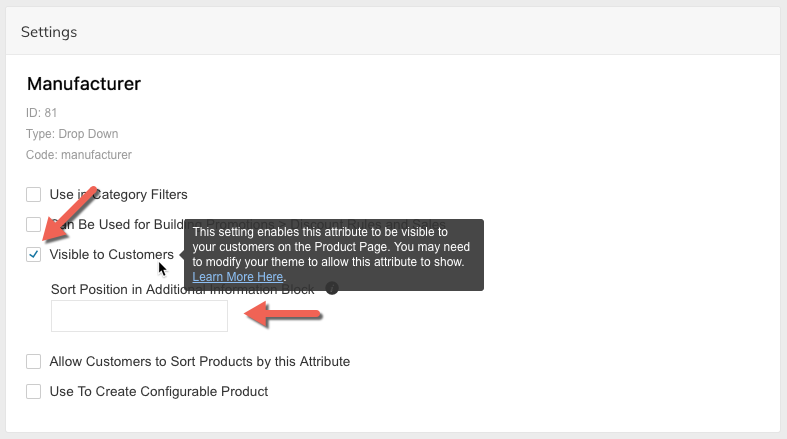
You can control sort positioning of attributes in the Additional Information table by specifying a sort position in Products > Attributes (see below):
The Additional Information block is a "Table" and naturally not good for mobile. We recommend using the Single Attribute Block in your design.
If the MSRP price is showing in the Additional Information table, then something isn't right. Please contact Zoey Support directly.
0
Please sign in to leave a comment.
Comments
1 comment