
Once you have your basic store information set up like products and categories, maybe some informational pages, you want to make sure potential customers will find your store through search engines like Google. If you are also sharing your products via social media you want to know the right information is coming with them. This article will give you the basics of Meta Data, the how and why adding this to your products and categories could positively impact your traffic and revenue.
Please Note: We're happy to show you where these tools are, but to get the most use out of them and set your store on the road to success, we recommend contacting one of our Agency Partners.
Zoey Support is unable to troubleshoot or advise on SEO content and use.
| 1 | What is Meta Data? |
| 2 | Meta Titles |
| 3 | Meta Descriptions |
| 4 | Meta Keywords |
| 5 | Adding and Updating Meta Data in Zoey |
| Learn More |
What is Meta Data?
When you search for an item, information or a site on a search engine, Meta Data is not only what you see but also why your search terms yielded those results. If you Google Zoey Commerce you will see the below...

You can quickly see you have found what you were looking for. These are shown in the following order:
- Meta Title (also known as Page Name)
- URL
- Meta Description
Now let's look at what these are and how to update or add them to your store.
Meta Titles
Meta titles, also known as page names, are shown not only on the search results but also in browser tabs once the customer is in your store. It's recommended to keep titles to 55 characters or less. This will help assure the full title is shown in search results. This should be short, unique and to the point, encouraging buyers that they have found exactly what they are looking for.
Moz, SEO experts, recommends using the following format:
Primary Keyword - Secondary Keyword | Brand Name
If you sell high end vacation packages for example, this could be something along the lines of:
Maui Getaway - Luxury Resorts | Awesome Vacations
Moz also has a great article with more information on meta titles here: Title Tag
Meta Descriptions
These are extremely important to keep unique and informational. It's the first look your customer has into your store and your products. You have 160 characters or less to catch the potential customer's attention and highlight the keywords they are looking for. The information that goes in here should be created around what a user may be searching for and will find in your store.
Here's a possible meta description for our example travel company:
Best prices in Luxury Travel- Awesome Vacations has been serving customers since 1800. Lowest deals in the most exclusive resorts and customized tours
It's informational, hits the keywords customers are searching for like Luxury, Resorts and Lowest Price. This could be a good meta description for their homepage. But only their homepage. Using this as a blanket description across all products and categories might result in their pages being marked as duplicate content or spam. Blanket descriptions give no added value to your page- it doesn't give any further search terms that may match what a user is looking for.
Unique short pitches on the product will help you showcase your pages across more searches as they use different keywords. We also recommend not using the information your manufacturer chose as a description or has otherwise supplied you. This content will be seen on other sites as well, which does not help set you apart from the crowd and supply new information.
Moz has a useful article on this if you'd like to look deeper: Meta Description
Meta Keywords
This is one of the main areas users ask us about as they are often posed as the first thing to look in to for SEO. Meta keywords are considered to be more or less outdated. Most search engines ignore keywords as these have been overused by sites trying to get additional views for searches that have nothing to do with the page.
Many people still use keywords and although you may have migrated over this information from an old store, some experts recommended not to use these. Meta keywords don't have an effect on your search engine ranking, and some suggest they give your competitors a quick look at the key items and markets you are targeting.
Adding and Updating Meta Data in Zoey
There are three areas you will find to update this information: Products, Categories, and CMS (Informational) Pages.
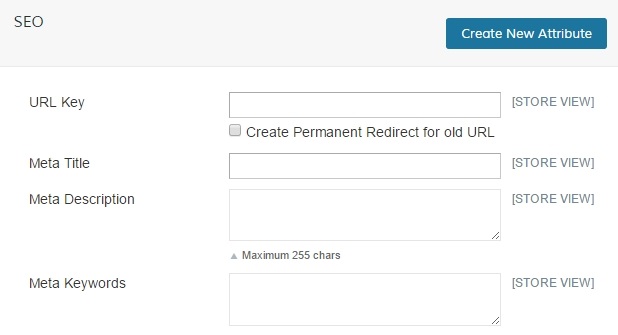
Product Meta Data will be found on the individual products by going to Products > Product List and clicking on the item you wish to update. You will generally find this information under the SEO area of the product's navigation, but this could differ depending on your Attribute Set configuration.
You'll find everything you need for this product - URL Key, Meta Title, Meta Description and Meta Keywords. This is easiest to do when you create the product, but you can always update via CSV after creation - this will also let you update the information for multiple products at once.
Category Meta Data will be found on any category by going to Products > Categories and selecting the category you wish to update. Under the General Information area, you'll find Page Title (same as meta title), Meta Description and Meta Keywords.
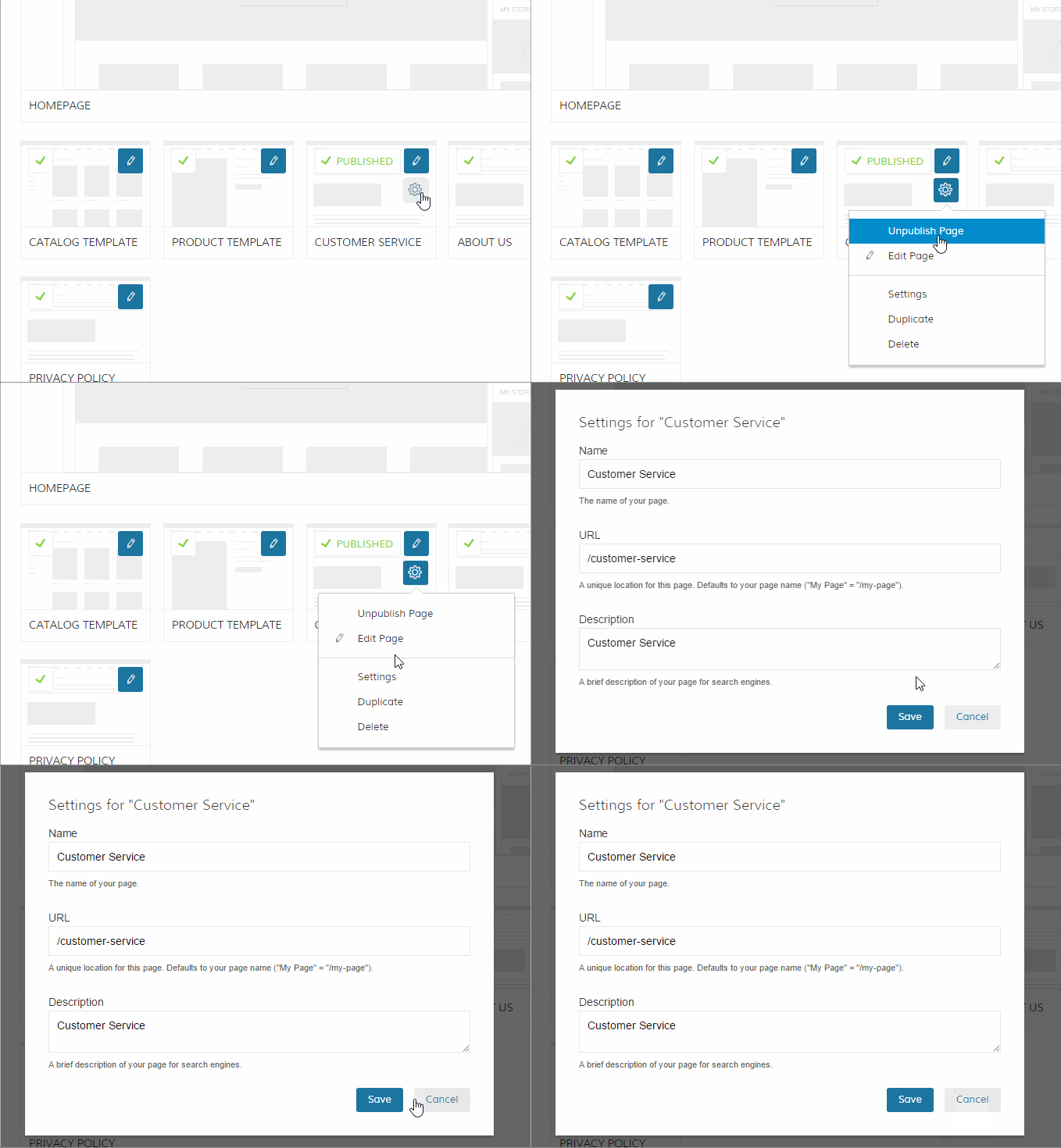
Doing the SEO for a page? You can use the settings, or gear icon, for that page to access the Name (Meta Title), URL Key and Meta Description as shown below.
You are now able to update the information search engines collect, helping new customers find you through their searches!
Learn More
Remember: We're happy to show you where these tools are, but to get the most use out of them and set your store on the road to success, we recommend contacting one of our Agency Partners.
Zoey Support is unable to troubleshoot or advise on SEO content and use.
Ready to walk through other SEO tools found in Zoey? Check out the following:
Comments
0 comments
Please sign in to leave a comment.