
One of the main issues that we receive is products not showing up in the front end of the store. Here are some of the common reasons you may be having an issue.
- Are the items Active and Visible?
Under Products > Product List make sure that you have selected the options you need. To update either of these, click on the product to edit.
Status: Enabled for products that are currently being sold, Disabled for those that are not.
Visibility: Not Visible Individually for items such as "Large Red Tshirt" that would only be bought through a configurable product. Catalog for items that will show on the category page. Search for items that can be searched for. Catalog, Search for items that will show both in the categories and through search.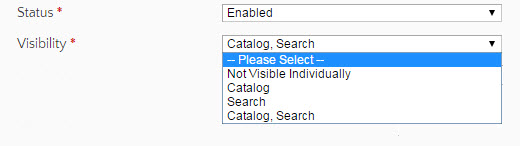
- Is there inventory and is it listed as in stock?
Under Products > Product List
If you are managing the stock for this item, make sure that you have a quantity in as well as it listed as "In Stock"
Click on the product and navigate to the Inventory section to update. - Does your new configurable product have Associated Products?
These are the simple products that can be bought from the Configurable product, such as Large, Medium and Small. - Is your product associated to your website?
If you've uploaded via CSV and did not use "_product_websites" you may need to associate them to your site. You can do this with Actions. - While uploading photos, do you receive the error "SSL Error: Invalid or self-signed certificate"?
You may be using an unsupported browser! At this time Zoey Control Panels only support Google Chrome - Are you receiving "Page not Found" from the front of store?
Go to Edit My Design and publish your product template!
Make sure after you have added your new products and wrapped up your changes you go to Advanced > Store Refresh! Also follow any alerts at the top of your control panel for Cache or Index updating. You can manually refresh these by going into Advanced > Cache / Index > and selecting either Cache Management or Index Management.
Comments
0 comments
Please sign in to leave a comment.