
To import your existing customer information into Zoey, you must format your files properly. This tutorial will tell you what attributes you need to include in order to successfully import a file.
The file that you upload must be in Comma-Separated Values (CSV) format. Most spreadsheet and database applications can create CSV files- Excel is the most common of these programs. If you use a Mac, save the CSV as CSV (Windows) file- your Zoey store will not be able to read the file otherwise.
The total size of of the CSV file cannot exceed 110M.
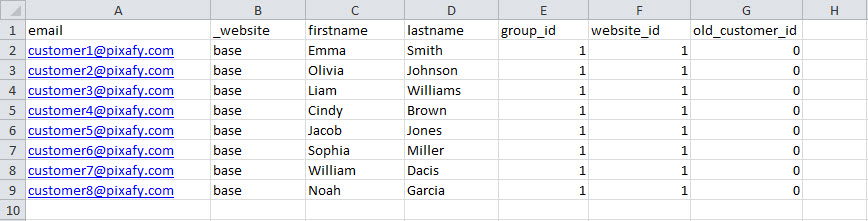
Required Customer Attributes (written as they should appear in the CSV file column)
- email
The customer's email- this will be their log in. - _website
By default, this will be base - firstname
Customer's first or given name. - lastname
Customer's last or family name. - group_id
The group to which the customer belongs. By default you already have a few available and you can use 1 for the "General" Group.
Click here to learn more about: Customer Groups - website_id
By default, this will be 1 - old_customer_id
If the customer is being imported to Zoey for the first time, this value must be 0. If you are merging or updating a record, refer to their current Zoey Customer Account for their id number.
Here's an example of an upload of new customers which will import without error:
Comments
0 comments
Please sign in to leave a comment.