
If you are finding the following message on your parent product page: "There are no products matching the selection" even though the Child Category pages have products, most likely the category is not set to Anchor.
This can be fixed by setting this Category to Is Anchor = Yes under the Category's Display Settings tab. Turning this on will also turn on the Layered Navigation, allowing users to sort through items based on attributes or category.
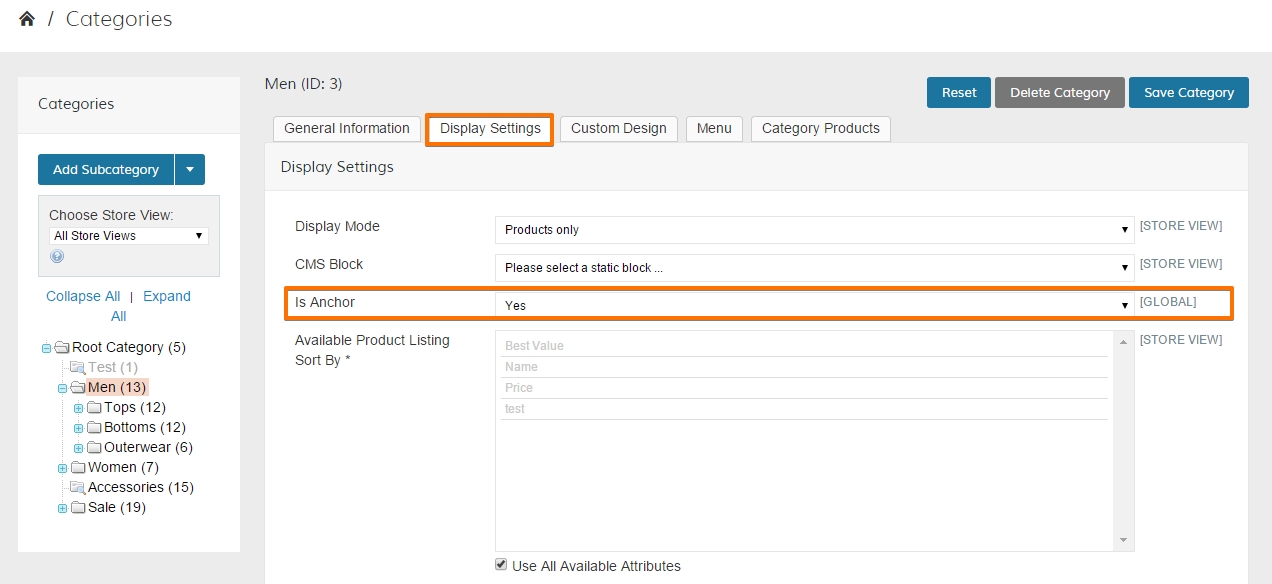
Changing Is Anchor to YES will allow the Parent Category to Inherit the Child Category Products as well.
Anchor Categories will inherit the number of UNIQUE products in all of their child categories. As can be seen above, the Tops, Bottoms and Outerwear categories all have 12, 12 and 6 products, but since they share many of the same products, the Parent Anchor Category (Men) only inherits those 13 unique products.
Click here to find more information on Troubleshooting Products.
Comments
0 comments
Please sign in to leave a comment.