
Zoey is proud to introduce this wonderful new Products list for Better Product Management.
 Use the gear tool to add or remove additional columns.
- Use the Search function to find an attribute
- Click an Active Columns' blue "x" to remove an attribute from your view
- Click Add Columns to select from a list of attributes to add to your product list!
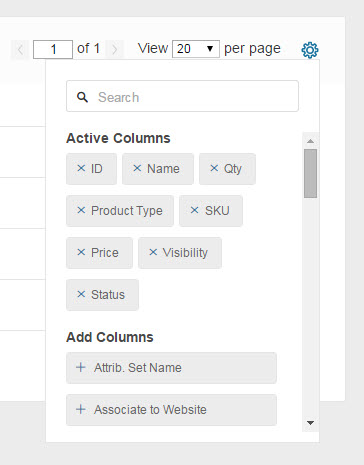
Once you have attributes you need, drag and drop to reorganize them!
Tips & Tricks:
- Use the Base Image attribute to view the product's image straight from the Products page making identification quick & easy- not to mention easily see products missing images!
- Attributes with Text Field or Text Area can not be used for sorting on your Products List. Try one with Dropdown or Yes / No!
Please note that clearing your browser's cache & cookies may reset your view to the default version.
Comments
0 comments
Please sign in to leave a comment.